

Most people buy a good office chair and then never touch a single lever on it again. That's the real problem, not the chair. A $1,200 ergonomic chair set up wrong will hurt your back just as fast as a $150 one. This guide walks through every adjustment that actually matters, in the order that actually matters, so the chair you already own starts doing its job. Think of it as the short course on how to adjust an office chair for ergonomics, whether you're setting up a brand new ergonomic office chair or fixing one you've been sitting in wrong for years.
TL;DR: The 20-Second Verdict
Feet flat on the floor, knees around 90 degrees: seat height, done. Two or three fingers of space behind your knees gets the seat depth right. Push the lumbar support into the actual curve of your lower back, not up by your shoulder blades, and don't sit ramrod straight all day, lean the backrest back somewhere around 100 to 110 degrees instead. Drop the armrests until your shoulders stop creeping up toward your ears. That covers most of it. Everything past this point is really just explaining why, and walking through how. Most modern chairs let you easily adjust seat height, backrest height, and armrest position independently, so there's no reason to settle for a sitting position that only sort of works.
Why Proper Chair Adjustment Matters
A chair that's adjusted wrong doesn't feel wrong right away. That's what makes it dangerous. You don't notice the strain in the first twenty minutes. You notice it three hours in, when your lower back is aching and you can't figure out why, because the chair looked fine and felt fine when you sat down.
Every adjustment on an ergonomic chair is solving the same underlying problem: keeping your spine close to its natural shape while you sit still for hours, which isn't something the human body handles gracefully on its own. Height thrown off? Your knees and hips take the hit. Lumbar support in the wrong spot, and your lower back rounds out, which is genuinely where most desk-job back pain starts. None of this is optional. It's the entire reason you paid for an ergonomic chair instead of a folding one, and a cheap adjustable chair with real range of motion still beats an expensive one that's locked into a single position.
The Myth of "One-Size-Fits-All" Ergonomics
There's no single correct chair setting, no matter what a buying guide's spec sheet implies. Dial a chair in perfectly for someone 5'4", and it'll actively hurt a 6'2" person sitting in that exact same spot. Torso length, leg length, arm length, body proportions vary too much for one preset to fit everyone.
That's why every adjustment in this guide gets measured against your own body and not some diagram. Sharing a desk with someone else, or setting up a chair for a new hire? Don't assume the last person's settings are close enough. They almost never are.
A Step-by-Step Guide to Adjusting Your Ergonomic Chair
Work through these in order. Each one affects the next, so doing them out of sequence usually means redoing an earlier step anyway.
1. Set Your Seat Height
Stand next to the chair and raise or lower it until the highest point of the seat sits just below your kneecap, then sit down and check your feet. They should rest flat on the floor with your knees bent around 90 degrees, give or take. A desk that won't budge and doesn't match your chair height isn't something the chair can fix on its own, grab a footrest or a desk riser instead of wrestling with it for the next two years.
2. Adjust the Seat Depth
Scoot all the way back until your spine's against the backrest, then slide the seat forward or back until two or three fingers fit between the seat edge and the back of your knees. Sit too deep and the front lip cuts into your calves, cutting off circulation. Too shallow, and your thighs get nothing, all that extra weight lands on your tailbone instead. There's a rougher version of the same test: try sliding a clenched fist into the space behind your knee. If it pinches, the seat's still too deep.
3. Position the Lumbar Support
People skip this adjustment more than any other, and it's the one that matters most. Slide or inflate the lumbar support until it actually sits in the curve of your lower back, roughly at belt-line height, not up near your shoulder blades where it does nothing. A lumbar pad in the wrong spot is decoration, not support, it has to physically press into that inward curve just above your hips. On a chair like the Herman Miller Aeron, that's the difference between the classic adjustable pad and the PostureFit system: two ways of solving the same problem, and neither one works if it's left wherever it shipped from the factory.
4. Set the Backrest Angle and Recline Tension
Eight hours upright puts more strain on your spine than a slight recline does. Set the backrest somewhere between 100 and 110 degrees, tilted just past vertical, and dial in the tension so it doesn't launch you backward every time you lean in to think. A tilt lock, if your chair has one, keeps that angle from drifting while you type. Whatever it's labeled, tension dial or tension knob, the job's the same: adjust the backrest resistance until leaning back takes a little effort, not zero, and not a fight either.
5. Calibrate Your Armrests
Set the armrests so your shoulders drop instead of creeping toward your ears, elbows bent around 90 degrees with your hands resting on the keyboard. Width and pivot adjustments, if your chair has them, let you tuck your elbows against your sides instead of letting them wing out. Match armrest height to elbow height as closely as the mechanism allows.
6. Adjust the Headrest, If Your Chair Has One
A headrest's job is supporting the base of your skull when you recline, nothing more, it shouldn't push your neck forward. Set it so it only touches your head during an actual recline, and ignore it completely while you're upright and typing. A headrest pressed against your neck the whole time does more harm than skipping one entirely.
7. Match Your Chair to Your Desk Height
With the chair dialed in, look at the desk. Elbows should land roughly level with the keyboard, shoulders relaxed. A desk that's too tall and leaves your feet dangling calls for a footrest. Too short, and a riser or sit-stand converter handles it without touching the chair settings at all.
What's So Controversial About Armrests?
Ergonomists genuinely disagree here. Some say armrests should support your forearms while typing to take load off your shoulders. Others say resting them increases wrist strain and that your arms should stay loose, only resting on breaks. It really comes down to build and typing style. Shoulders creeping up when you lean on the armrests is the tell, drop them out of the way at that point instead of forcing something uncomfortable.
Common Office Chair Adjustment Mistakes
A handful of mistakes repeat across offices full of the most adjustable chairs money can buy. None of that adjustability fixes poor posture if the back rest sits wherever it shipped from the factory, and sliding the lumbar pad into its proper spot, ten seconds tops, does more for good posture than the spec sheet ever will. A good chair is only as good as the last time somebody actually touched the controls.
Compensating for a tall desk by cranking the seat too high is the top offender. It solves the height mismatch on paper but leaves feet dangling, cutting circulation and stacking pressure behind the knees. The desk's the real problem there, not the chair.
Leaving the lumbar support at its factory default is a close second. Most chairs ship with it centered for some average build that fits almost nobody exactly, so just spend the two minutes it takes to move it.
Cranking the recline tension too far the other way is just as common. Real effort to lean back means the chair's fighting you instead of helping, and most people respond by sitting rigid without even noticing.
The Best Mesh Office Chairs We've Tested for 2026
A properly adjusted mesh chair makes every step above easier to hit, because the mechanism actually responds when you move it. These are four we'd point a reader toward, at four different price points.
Haworth Very Mesh Office Chair with Adjustable Lumbar

The Haworth Very is the pick if you want commercial-grade mechanics without the commercial-grade price. It's a refurbished chair, and the reason it sits under $300 has nothing to do with cut corners: this batch shipped with light gray cushioning instead of the black most corporate buyers request, so it's priced to move. Underneath, it's the same chair, with 4D armrests, a synchro-tilt mechanism, and an adjustable lumbar pad that actually slides into position instead of just sitting there for show.
- Adjustable Lumbar Support: Slides to meet your lower back instead of forcing you to meet it, which is the whole point of step 3 above.
- Synchro-Tilt Mechanism: Keeps your feet flat on the floor through the whole recline instead of tipping you back at some fixed ratio.
- 4D Armrests: They adjust in height, width, pivot, and depth, so your elbows can actually tuck in instead of winging out.
- Seat Depth Slider: The seat pan moves independently of the backrest, which matters if your torso and legs don't match average proportions.
It ships partially assembled and carries a 2-year mechanical warranty on the gas cylinder, tilt, and casters, refurbished condition, not new, but tested and cleaned before it goes out.
Herman Miller Classic Aeron Chair, Fully Adjustable (Renewed)

The Aeron is the chair most of this guide's advice was written around in the first place. This is a genuine Herman Miller Aeron, independently refurbished by OfficeLogixShop, not an official Herman Miller product or partnership, put through a 9-point inspection before it ships. You get forward tilt, a rear tilt lock, and a choice between classic adjustable lumbar or the PostureFit system, along with fully adjustable arms that pivot and change height independently.
- Forward Tilt and Rear Tilt Lock: Covers the recline range this guide's step 4 talks about, plus a forward-leaning position most chairs skip entirely.
- Lumbar Support Options: Choose adjustable lumbar or PostureFit depending on whether you want a pad or a more structured sacral support.
- Pellicle Mesh Suspension: The original breathable mesh design Herman Miller built its reputation on, it conforms to your body instead of compressing flat like foam does over time.
- Fully Adjustable Arms: Height and pivot control independently, which matters more than people expect once you've set your seat height correctly in step 1.
It's not cheap even refurbished, but it comes with a 5-year mechanical warranty covering the lumbar system, hydraulics, and tilt lock, and it holds up well enough that a used one is still a reasonable buy a decade later.
Herman Miller Mirra Chair (Renewed)

If the Aeron is out of budget but you still want genuine Herman Miller engineering, the Mirra is the honest answer. It's built around TriFlex back technology, three zones in the backrest that flex independently instead of one rigid panel pushing back uniformly, plus an AireWeave suspension seat and a FlexFront edge that reduces pressure behind your knees.
- TriFlex Back Technology: Responds to your spine's movement in three separate zones instead of treating your whole back as one flat surface.
- FlexFront Seat Edge: Softens right where the seat pan cuts across the back of your knees, which is exactly the spot step 2 above tells you to watch.
- Dynamic Lumbar Support: Adjusts vertically to hit your lower back's actual curve, useful for shorter or taller users the factory default doesn't fit.
- Tilt Tension and Limiter: Controls how much resistance you feel leaning back and how far the recline goes, so it doesn't fling you backward like an under-tensioned chair can.
It's a genuine Herman Miller product, independently refurbished by OfficeLogixShop rather than sold or serviced by Herman Miller directly, and it comes with a 5-year mechanical warranty at under half the price of a comparable new chair.
Nova Logix Ergonomic Chair (New)

The Nova Logix is OfficeLogixShop's own chair, and it's brand new, not refurbished like most of the picks above. It's built around an Italian Donati mechanism, the same caliber of hardware used across premium ergonomic chairs, paired with a 32-plus inch high-back that runs all the way up past your shoulder blades. For a Herman Miller alternative that doesn't involve buying used, this is the one to look at.
- Italian Donati Mechanism: The same class of mechanism you'll find in a lot of premium chairs, smooth recline and an infinite tilt lock, no cheap plastic knob to fight with.
- 32+ Inch High-Back: Extends support all the way to your neck, closing the headrest gap this guide's step 6 talks about before you even need one.
- Adjustable Seat Depth: Slides 5 to 6 inches, so the two-to-three-finger test from step 2 works no matter your leg length.
- Dynamic Lumbar: Moves vertically with your posture instead of staying fixed at whatever height it shipped at.
At $649.99 before the site's automatic discount, it's priced to compete directly with a refurbished Aeron, brand new instead of renewed, and backed by the same 5-year mechanical warranty as OfficeLogixShop's other high-end picks.
This Gaming Chair Gets You in the Zone for Hours
Gaming Chair with Mesh High Back by OfficeLogixShop
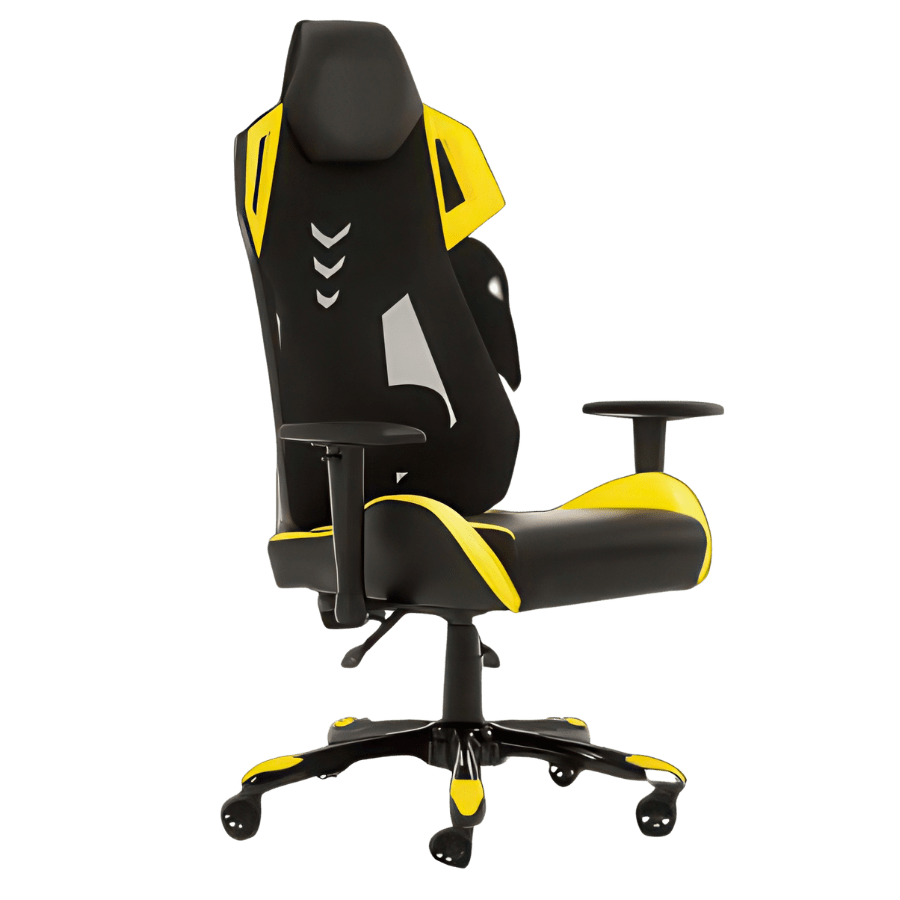
Not every desk lives in a corporate office, and this mesh high back gaming chair applies the same adjustment principles this guide covers, just built for longer, more upright focus sessions instead of a boardroom. It's brand new rather than refurbished, with a breathable mesh backrest in place of the all-foam builds most gaming chairs still use, so it doesn't trap heat the way a leatherette shell does after a few hours.
- Mesh High Back: Air keeps moving through long sessions instead of building up heat against a foam-and-vinyl shell.
- Customizable Recline: You get multiple locked positions instead of one fixed angle, so dialing in the 100 to 110 degree range this guide recommends is actually possible.
- Spine-Friendly Backrest: It follows your spine's curve instead of forcing a flat, rigid line down your back.
- Adjustable Armrests: Height and angle adjust to match different desk heights, same principle as step 5 above.
At just over $200, it's priced more like a standard task chair than a premium gaming chair, and OfficeLogixShop backs it with a no-questions-asked return policy if the fit's wrong.
Creating a Complete Ergonomic Workstation
Even a perfectly adjusted chair can leave you with a stiff neck if the rest of your setup is off. Your monitor's top edge should sit roughly at eye level, about an arm's length away, so you're not tilting your head down or craning forward just to read it. Keep the keyboard and mouse close enough that your elbows stay near your sides instead of reaching for them. None of this costs anything beyond a few minutes spent adjusting what you already own.
How Often Should You Readjust Your Office Chair?
Check your settings any time something changes, a new desk, different shoes with a different heel height, even a few weeks spent working from a different chair. Beyond that, a quick re-check every few months is worth it, since most people drift out of their settings gradually without noticing, usually by leaning the backrest back a little more each week until it's nowhere close to where they originally set it. You don't need to adjust your office chair from the ground up every time something feels slightly off, and you're not chasing perfect posture here, just a setup that stops actively working against you.
FAQ
How long does it take to get used to a new ergonomic chair?
Usually a few days to two weeks. Your body's likely adapted to years of bad posture, so a properly adjusted chair can feel strange, even slightly uncomfortable at first, simply because it's unfamiliar. Still in real pain after two weeks? At that point it's probably the settings, not the adjustment period, that are still off.
Is a pillow a good substitute for built-in lumbar support?
It can work in a pinch, but it's a downgrade. A pillow shifts position every time you move, and it rarely holds the curve where you actually need it. Without adjustable lumbar support built into the chair, a dedicated lumbar cushion designed for the job will outperform a couch pillow every time.
How do I check if my office chair is adjusted correctly?
Sit normally for a few minutes, then check three things: feet flat on the floor, a small gap behind your knees, and a lower back that feels supported rather than rounded. Any of those off? Walk back through the step-by-step section above.
Bottom Line
None of these adjustments take more than ten minutes combined, and most people never make them at all. The chair you already have is probably capable of a lot more comfort than it's currently giving you. Set it up properly once, and check back on it every few months.